Or: how a stray entry in a Pi-hole log led me to a seven-year-old bug in Charter’s authoritative DNS.
It started with a line in a log.
I run Pi-hole on a couple of Raspberry Pis on my home network. It blocks ads and tracking and a long list of telemetry endpoints I’d rather not have my devices phoning home to. Most days I don’t think about it. But occasionally I pull up the query log just to see what’s flowing through, and I scan for anything that looks weird.
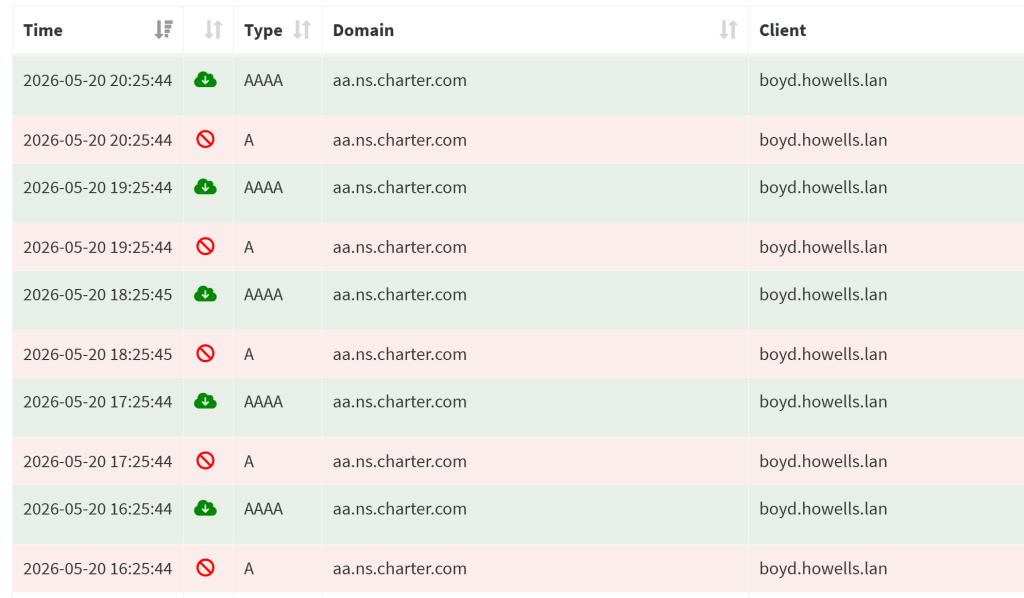
What caught my eye was this:
aa.ns.charter.com. Hourly. Blocked. From one of my domain controllers.
Charter is Spectrum, my ISP. The hostname looks like one of their nameservers. The query was coming from inside the house, so to speak. A Windows Server running Active Directory was asking my Pi-hole to resolve this name, on the hour, every hour, and Pi-hole was flagging it as blocked.
There are a lot of reasons something might end up in a Pi-hole log. Most of them are boring. This one looked boring at first. But I poked at it for a few minutes, and what I thought would be a five-minute mystery turned into something much more interesting.
This is what I found.
The setup
Let me sketch the environment, because some details matter and most don’t.
I run three Windows Server 2025 domain controllers on my home lab: SKYE, BOYD, and EMMA. They’re all on a flat 192.168.2.0/24 subnet. They handle Active Directory and internal DNS for a domain called howells.lan.
Outbound DNS from those DCs flows through two Raspberry Pi-hole instances, Pi3 and Pi4. The DCs forward to the Pis; the Pis run dnscrypt-proxy upstream, which uses encrypted DNS to Cloudflare, Quad9, and NextDNS. Pi-hole blocks anything that’s on one of its 33 adlists, and dnscrypt-proxy enforces strict DNSSEC validation on everything that gets through.
The whole pipeline is designed to be paranoid in a particular way: every external lookup is encrypted, validated, and filtered, with redundancy at every layer.
The query I noticed was hitting Pi3, logged against SKYE as the client (192.168.2.11), asking for an A record for aa.ns.charter.com. Pi-hole was returning 0.0.0.0 and marking it blocked.
My first thought was: which of the 33 adlists is catching a Charter nameserver hostname? That seemed odd. Adlists usually target ad networks and trackers, not ISP infrastructure.
The first wrong turn
Pi-hole has a built-in tool for exactly this question. It’s called “Find Domains in Lists.” You type in a hostname and it tells you, definitively, which of your installed blocklists contain it.
I typed in aa.ns.charter.com.
Found 0 domains partially matching 'aa.ns.charter.com'.Found 0 lists partially matching 'aa.ns.charter.com'.Number of results per type:- 0 exact domain matches- 0 regex domain matches- 0 allowlist (antigravity) matches- 0 blocklist (gravity) matches
Zero.
So whatever was happening, it wasn’t a blocklist hit. Pi-hole was flagging the query as blocked, but no list of mine was telling it to. That’s interesting. Pi-hole doesn’t just block things on a whim. Something else was producing the “blocked” status.
I checked the response time in the query log. 69 microseconds for the A record. That’s not a real upstream lookup, that’s a cached or synthesized response. Whatever Pi-hole was doing, it was returning an answer almost instantly.
I looked at what the upstream resolvers actually said. From Pi3, I ran a direct dig against the dnscrypt-proxy upstream, and then bypassed it and asked Cloudflare and Quad9 directly:
$ dig aa.ns.charter.com A +short0.0.0.0
All three resolvers, my dnscrypt chain, Cloudflare’s 1.1.1.1, and Quad9’s 9.9.9.9, returned the same thing. aa.ns.charter.com resolves to 0.0.0.0.
That changed the picture entirely. Pi-hole wasn’t blocking the query in the sense of consulting a list and refusing it. Pi-hole was receiving the authoritative answer 0.0.0.0 from upstream, recognizing it as a null/sinkhole address, and flagging it in the UI as a block. That’s a default Pi-hole v6 behavior: any A record that resolves to 0.0.0.0 (or AAAA to ::) gets treated as a blocked response, regardless of source.
So the question wasn’t “why is Pi-hole blocking this.” The question was “why does aa.ns.charter.com resolve to 0.0.0.0, and why is my domain controller asking about it once an hour?”
Two questions, actually. I started with the second one.
Hunting the process
If something on SKYE was generating a DNS query every hour, I figured I could find it. Windows is reasonably well-instrumented for this kind of thing if you know where to look.
I started with active network connections. Get-NetTCPConnection, filtered to anything talking outbound:
RemoteAddress RemotePort OwningProcess------------- ---------- -------------204.79.197.203 80 795623.11.32.159 80 795620.1.248.118 443 795620.59.87.225 443 2760
PID 7956 was making three outbound connections, two of them to Microsoft IP space on port 80. Promising. I looked up the process.
ProcessName : StartMenuExperienceHostPath : C:\Windows\SystemApps\...Description : Windows Start Experience Host
It was the Start menu.
I had an active RDP session open on SKYE while I was investigating. The Start menu was sitting on screen, doing what Start menus do, which apparently includes polling Microsoft endpoints every ten seconds for “recommendations” and live tile updates. That’s a real Pi-hole entry I’d been seeing every ten seconds for g.live.com, blocked dutifully. But it wasn’t my hourly Charter query. Wrong process, but I’d at least confirmed I knew how to find the right one.
The other PID, 2760, was WpnService, the Windows Push Notification Service. That’s expected. It maintains a long-lived TLS connection to Microsoft’s notification infrastructure for toast notifications. Also not my culprit.
Next I looked at scheduled tasks with run times near the :19 mark, since the Charter queries were landing at :19:32 every hour.
TaskName NextRunTime -------- ----------- WakeUpAndScanForUpdates 5/19/2026 12:19:23 AMCollection 5/18/2026 6:19:56 PM
Collection. Hourly. Next run at 6:19:56 PM. That was suspiciously close to my Pi-hole pattern.
The task lived at \Microsoft\Windows\Software Inventory Logging\Collection and ran a command called silcollector.cmd publish as SYSTEM. I’d never heard of SIL (Software Inventory Logging), but a few minutes of reading told me it was a Windows Server feature designed to periodically inventory installed software and licensing data and publish it to a configured target. It was introduced in Server 2012 R2 for datacenter compliance reporting.
This felt like the answer. A SYSTEM-context task that runs hourly, does some kind of inventory or telemetry, and might reasonably touch the network in the process.
I checked whether SIL was actually configured to publish anywhere:
State : StoppedTimeOfDay : 1/1/2000 3:00:00 AMTargetUri :CertificateThumbprint :
Nope. SIL was Stopped, no target URI. But the scheduled task that runs silcollector.cmd publish was still enabled and still firing hourly. The cmd file would do its inventory collection regardless of whether anything got published.
I ran the cmd manually as my admin user, watched Pi-hole’s live query log, and waited.
6:32:05 PM - silcollector.cmd publish executed
Within the next 30 seconds, I saw queries for roaming.svc.cloud.microsoft, accounts.google.com, app.ps.five9.com, fonts.googleapis.com, and a handful of other Office and browser telemetry endpoints. All from my active RDP session.
No aa.ns.charter.com. None.
SIL wasn’t doing it. The timing was a coincidence.
I’d been wrong, but I’d at least learned something: whatever was generating the Charter query wasn’t using the standard Windows DNS Client resolver. If it had been, the manual SIL invocation should have surfaced something Charter-related in the immediate aftermath. The process making this hourly query was bypassing the Windows DNS Client API entirely.
A pattern that didn’t quite fit
I pulled the full history of aa.ns.charter.com queries from Pi3 going back about 24 hours.
2026-05-18 19:19:33 skye.howells.lan2026-05-18 18:19:33 skye.howells.lan2026-05-18 15:19:33 skye.howells.lan2026-05-18 14:19:32 skye.howells.lan2026-05-18 12:19:32 skye.howells.lan2026-05-18 11:19:32 skye.howells.lan2026-05-18 10:19:32 skye.howells.lan2026-05-18 09:19:27 skye.howells.lan2026-05-18 08:28:40 skye.howells.lan2026-05-18 05:28:40 skye.howells.lan2026-05-18 03:28:40 skye.howells.lan...
Two things jumped out.
First, the cadence wasn’t strictly hourly. There were skipped hours. 13:00, 16:00, 17:00, nothing. The pattern was “roughly hourly with occasional misses.” That’s not what you get from a scheduled task with a fixed timer. That’s what you get from a process that does something on a periodic cycle but occasionally skips when conditions don’t match.
Second, the seconds offset shifted partway through the day. Earlier entries were at :28:39-40. Later ones were at :19:27-33. Something restarted between 8:28 and 9:19 in the morning, and the timer reset to a new offset.
I checked the system event log for service starts in that window:
9:00:57 AM Windows Modules Installer service entered running state9:00:59 AM Windows Update service entered running state 9:01:28 AM Software Protection service entered running state9:01:28 AM AppX Deployment Service entered running state
Routine Windows Update maintenance. Something had restarted between those two timestamps, and the new instance picked up a new start-time anchor. Whatever was driving the hourly query was tied to a service that restarts, not to a fixed clock.
That helped explain the cadence drift. It didn’t yet explain the cause. But it did confirm I was looking at a long-lived background process, not a scheduled task. Scheduled tasks fire on absolute clock times. Long-lived processes that do something hourly fire on offsets relative to their own start time, and reset when they restart.
That was the right shape of thing to look for.
Reading the tea leaves
I went back and looked more carefully at the queries Pi3 was logging immediately before each aa.ns.charter.com lookup.
19:19:33 query[SOA] x.x.x.x.x.x.x.x.x.x.x.x.x.x.x.x.0.0.a.4.0.0.1.0.0.4.c.6.0.0.6.2.ip6.arpa from 192.168.2.1119:19:33 forwarded to 127.0.0.1#533519:19:33 reply is NODATA19:19:33 query[A] aa.ns.charter.com from 192.168.2.1119:19:33 blocked upstream with NULL address aa.ns.charter.com is 0.0.0.019:19:33 query[AAAA] aa.ns.charter.com from 192.168.2.11
The Charter query wasn’t appearing in isolation. It was the second step in a sequence. The first step was an SOA query for a name in ip6.arpa.
ip6.arpa is the reverse-DNS namespace for IPv6 addresses. When you want to ask “what hostname owns this IPv6 address?”, you construct a reverse-lookup name by reversing the nibbles of the address and appending .ip6.arpa, then ask for a PTR record.
The name SKYE was asking about decoded to an IPv6 address in Charter Communications’ 2600:6c00::/24 allocation, the public space their residential service uses.
So the query running through SKYE was a reverse-DNS lookup on a Charter IPv6 address. The query chain was traversing the ip6.arpa delegation, eventually landing at Charter’s authoritative nameservers for that block. And somewhere in that exchange, my DNS server ended up resolving aa.ns.charter.com. I did not yet know why.
That reframed everything. I wasn’t looking for “a process that queries Charter.” I was looking for “a process that does reverse DNS on an IPv6 address in Charter’s space.”
I checked my AD-integrated DNS zone for any records with IPv6 addresses in that range:
powershell
Get-DnsServerResourceRecord -ZoneName "howells.lan" -RRType AAAA
HostName RecordType IP-------- ---------- --CHELLE-PC3 AAAA 2600:6c40:xxxx:xxxx:xxxx:xxxx:xxxx:xxxxMIKE-PC3 AAAA 2600:6c40:xxxx:xxxx:xxxx:xxxx:xxxx:xxxx
There they were. Two Windows machines on my LAN had registered their public IPv6 addresses into my internal AD DNS zone, and those addresses were in Charter’s space. The client machines were periodically trying to register reverse PTR records for their Charter IPv6 addresses, and the domain controllers were forwarding the nameserver lookups that registration requires.
Now the question was: what’s actually broken about Charter’s infrastructure that makes this generate a 0.0.0.0 response?
The Charter trail
I traced the delegation chain from the roots down to Charter, looking for where aa.ns.charter.com enters the picture.
$ dig -x 2600:6c00:0:0::1 +trace +nodnssecip6.arpa. NS f.ip6-servers.arpa. NS c.ip6-servers.arpa. NS a.ip6-servers.arpa. ...0.6.2.ip6.arpa. NS r.arin.net. NS u.arin.net. NS x.arin.net. ...c.6.0.0.6.2.ip6.arpa. NS auth4.charter.com. NS auth3.charter.com. NS auth1.charter.com. NS auth2.charter.com.
The delegation looked clean. IANA points to ARIN’s nameservers for the 6.2.ip6.arpa parent. ARIN delegates c.6.0.0.6.2.ip6.arpa (Charter’s 2600:6c00::/24 reverse zone) to auth1–auth4.charter.com. Those are Charter’s current authoritative nameservers, and they responded authoritatively when I queried them.
So where was aa.ns.charter.com entering the chain?
I asked Charter’s authoritative servers directly for the SOA record on that reverse zone:
$ dig @auth1.charter.com SOA 0.4.c.6.0.0.6.2.ip6.arpa +noall +answer0.4.c.6.0.0.6.2.ip6.arpa. 14400 IN SOA aA.ns.charter.com. hostmaster.charter.com. 2019081361 7200 3600 604800 14400
There it was.
The SOA record, the Start of Authority, the record that identifies the primary master nameserver for a zone, names aA.ns.charter.com as the primary. That hostname has been decommissioned for years. It resolves to 0.0.0.0, presumably as a deliberate null route so that any client still trying to use it as a nameserver fails fast and stays failed.
But the SOA itself still references it. And the serial number is 2019081361, which decodes as August 13, 2019. Charter hasn’t updated this SOA in nearly seven years.
This was the cause, though not for the reason I first thought. My machines were not reading that SOA out of curiosity. They were trying to register a reverse PTR record for their Charter IPv6 addresses, and that is a dynamic DNS update. The protocol for those updates is RFC 2136, and it says the update has to go to the zone’s primary master. To find the primary master, the updater first asks for the zone’s SOA, then reads the MNAME (primary
master nameserver) field, which names it. The MNAME on this zone is aa.ns.charter.com. So my DNS server resolves aa.ns.charter.com to get an address to send the update to. Charter returns 0.0.0.0. The update has nowhere to go, and Pi-hole sees the 0.0.0.0 answer and flags it as blocked.
The bug is small: a stale hostname in one field of one SOA record at one ISP. But the chain of consequences from that one field to my Pi-hole UI showing dozens of “blocked” entries per day is a good example of how DNS quietly breaks in ways that nobody local to the problem can see.
Why did Charter do this?
The most likely answer is “Charter probably did update their delegation, but not their zone file.”
When Charter restructured their authoritative DNS infrastructure at some point in the 2010s, they correctly updated the delegation at ARIN to point at their new nameservers (auth1–auth4.charter.com). And they did the careful thing with the old hostnames: instead of deleting them entirely, which would have caused legacy clients to retry NXDOMAIN aggressively, they pointed them at 0.0.0.0. Any client still trying to use them as a nameserver would fail closed in a stable, predictable way.
That’s actually good engineering. The trap is that they forgot to update the SOA MNAME field inside the zone itself. The zone file still names aa.ns.charter.com as primary master. Most clients never read the MNAME. It is metadata that only matters when
something tries to update the zone. But anything attempting a dynamic update, like a Windows machine registering a reverse PTR record, has to resolve the MNAME to find where to send the update. And when it does, it generates exactly the noise I was seeing.
Charter probably has no idea. The bug is silent from their side. It produces no errors, no customer complaints, no operational impact. The only people who notice are people running their own recursive resolvers in environments that happen to have AD-integrated AAAA records in Charter’s address space, and who happen to look at their DNS logs carefully enough to wonder what aa.ns.charter.com is doing there.
What I missed
At this point I thought I had the whole story. I drafted a bug report to Charter’s NOC and sent it. I was going to wrap up the investigation.
But I had one nagging question. The hourly queries were only ever from SKYE. Not from BOYD. Not from EMMA. Why only one of three otherwise-identical DCs?
I dug through every possible difference I could think of. FSMO roles. OS versions. Scheduled tasks. DNS server cache contents. Scavenging settings. Stub zones. Conditional forwarders. Nothing distinguished SKYE from the other two DCs in any way that would explain it.
Eventually I realized I’d been looking at the wrong data. I had been searching Pi3’s query log. But BOYD’s DNS forwarders point exclusively to Pi4, not Pi3. If BOYD was generating the same queries, they’d be on Pi4, not Pi3.
I installed sqlite3 on both Pis and ran the same query against both pihole-FTL databases:
sql
SELECT datetime(timestamp,'unixepoch','localtime') AS time, client, domain, status FROM queries WHERE domain = 'aa.ns.charter.com'ORDER BY timestamp DESC LIMIT 15;
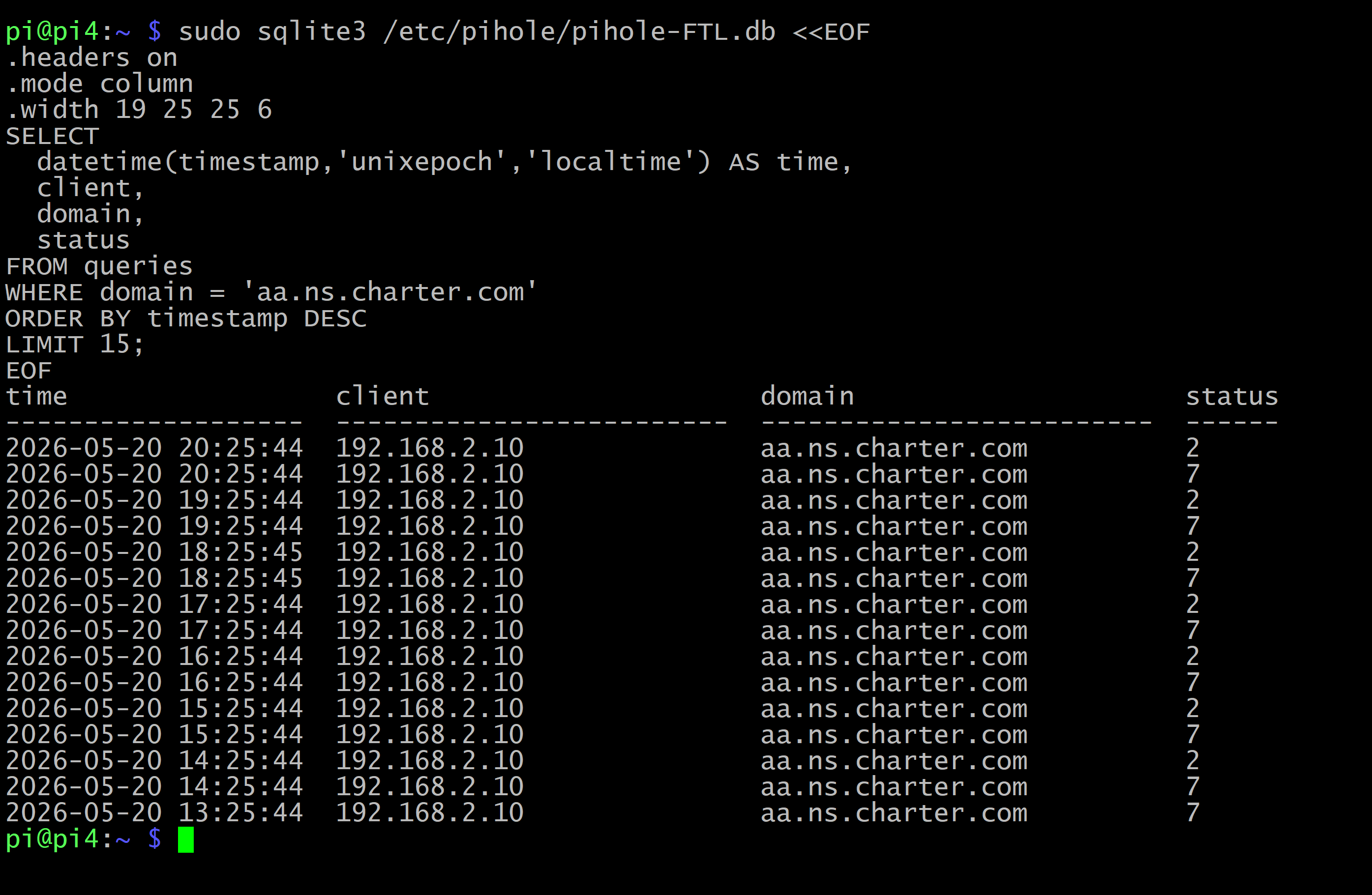
The combined picture was completely different from what I’d been seeing, and not in the direction I expected.
BOYD was in the Pi4 log doing the same thing SKYE was doing on Pi3. Hourly. Different offset, :00:50 instead of :19:33, but the same pattern. So my first instinct was that I’d undercounted. It wasn’t only SKYE. It was SKYE and BOYD, two domain controllers each producing this query on its own cycle. I’d been fooled by looking at one Pi-hole at a time. That instinct turned out to be close to right, which surprised me, because my next move was to talk myself out of it.
That instinct was also wrong, and it was the same mistake wearing a different coat.
So I went the other way and decided the DCs were not really the source at all. Every blocked entry in both Pi-hole logs lists a domain controller in the client column, and I had read that column, all the way through this investigation, as “the domain controller is asking.” A workstation owns the record that starts this, its own Charter IPv6 address registered into my AD zone, so I leapt to the idea that the DC was just a passive relay for the workstation’s own lookup. That was the wrong correction. The workstation owns the record, but it is the DC’s own resolver that goes out and walks the chain. The Pi-hole only ever sees the DC because the DC is the one making the outbound query, not because the DC is forwarding someone else’s.
I only sorted out which machine plays which role by capturing on both ends instead of staring at one. The workstation kicks the process off, it wants to register a reverse PTR record for its own Charter IPv6 address, and that registration has to find the zone’s primary master first. But the DC is the one that performs that lookup. Its resolver walks the SOA, reads the stale primary master, lands on aa.ns.charter.com, and gets 0.0.0.0, which is the exact sequence the Pi-hole logs show against the DC. The workstation starts it. The DC is the one knocking on Charter’s door.
So it was two domain controllers, not three. BOYD and SKYE both do it. EMMA does not, and that is not an accident of where I was looking. When I enabled diagnostic logging on all three, EMMA’s log stayed empty and its cache held nothing for this name across the whole window, while BOYD and SKYE both lit up. The trigger is a single workstation, MIKE-PC3, whose public Charter IPv6 address lives as an AAAA record in my AD-integrated zone and replicates to every DC. CHELLE-PC3, the only other machine with such a record, has been powered off for weeks, so it registers nothing. One workstation owns the record. Two domain controllers act on it. EMMA, holding the same replicated record, sits the whole thing out, and I still cannot tell you why it and not the other two.
I’d written the email to Charter saying “two Windows Server DNS recursors generate this query pattern hourly.” As it turns out that sentence was right, almost by accident. It is two, BOYD and SKYE, and they are recursors generating the query, exactly as written. I just did not actually know that when I wrote it, and I spent the next stretch of the investigation talking myself out of the correct answer before a packet capture talked me back into it. The bug I was reporting to Charter is real and unchanged either way.
What I’m doing about it
Nothing.
The behavior is harmless. My DCs work. My DNS resolution works. The queries get returned promptly. The only visible artifact is a few dozen log entries per day that look like blocks but aren’t really blocks in any meaningful sense.
I could remove the AAAA records for the affected machines from my AD zone, which would stop the trigger. I could disable IPv6 DNS registration on those clients, which would stop the records from coming back. But both of those are fixes for a problem that isn’t actually causing harm, and they’d touch configuration I’d rather leave alone.
The right fix is upstream, at Charter. If they ever do it, the queries stop and I never have to think about this again.
I sent them the bug report. I don’t have high hopes. The ARIN POC record for their NOC indicates they haven’t responded to ARIN’s own validation requests since 2020, which doesn’t suggest a particularly responsive inbox. But the email is in. We’ll see.
For any Charter engineer who finds this
If you work at Charter and you stumbled onto this post via a search for aa.ns.charter.com, here’s the fix: the SOA MNAME on the c.6.0.0.6.2.ip6.arpa reverse zone (and possibly other reverse zones in your IPv6 space) needs to be updated from aa.ns.charter.com to one of your current authoritative nameservers, probably auth1.charter.com. That’s a one-line change in a zone file. It will stop strict recursive resolvers around the internet from generating low-grade noise traffic against your 0.0.0.0 sinkhole every time they do reverse DNS on an address in your space.
No urgency. Nothing is broken. But it would be a nice cleanup.
Why I think this is worth writing up
A few things stayed with me. The bug is invisible from Charter’s side. Their systems are fine, their customers are fine, nobody is going to file a ticket about this. The only people who notice are people running their own recursive resolvers in environments that happen to trigger the chain. That’s a specific and small population, and there’s no path from inside Charter to ever finding the bug. It only gets found from outside.
The other thing is how many times I was wrong before I was right. I was wrong about the blocklist. I was wrong about SIL. I was wrong about “only SKYE,” then I overcorrected into “all three DCs,” then I overcorrected again into “the DCs are just relays for a workstation.” That last one is the one that stings, because I talked myself out of an answer that was basically correct. The DCs really were the ones generating the query, two of them, and I had to capture the recursion on the servers themselves before I would believe it. Each wrong turn took real effort to rule out, and the last one took a packet capture to settle. None of that effort was wasted, but it’s worth saying out loud. In this kind of work, most of your theories are wrong, and the job is proving them wrong methodically until the right one is left.
I started this expecting a five-minute mystery. It turned into a few hours of investigation, a bug report to a major ISP, and a blog post.
The line I noticed at the start is exactly the kind of thing most people would scroll past. I almost did. I’m glad I didn’t.
If you’ve got a Pi-hole and an unfamiliar entry in the log: pull the thread. You might be surprised what’s on the other end.
One thing I could not nail down
There is a single piece of this I never resolved, and I want to flag it honestly rather than pretend the case is airtight.
The failed lookup repeats on a roughly hourly cycle. I confirmed that much directly, on both BOYD and SKYE, in the DNS Server’s own recursion log. What I could not find is any documented Windows interval that explains the hour, or even pin down which timer inside the DNS Server is driving it.
I checked the obvious candidates and ruled them out by measurement. It is not a DHCPv6 lease, because the network is SLAAC only. It is not the 24-hour DefaultRegistrationRefreshInterval, which is absent on the machine. It is not exponential backoff, because the interval is flat, not lengthening. I also ran the question past several other analysis tools. The consensus was that no public Microsoft document names a one-hour retry interval for a failed dynamic registration, and the one source that claimed otherwise turned out to be fabricated and was retracted when I asked for the link.
My current best guess is that the hour is not a retry interval specific to this failing record at all. What kicks it off is a workstation doing a full registration pass, the IPv6 reverse and the IPv4 reverse together, not a targeted retry of the one broken record. So I suspect what I am watching is a periodic re-registration sweep, and the doomed IPv6 PTR simply rides along on every pass. That would also explain why it never backs off. A dumb sweep does not reason about individual records. It just re-runs the whole set. What I cannot account for is why two of my three domain controllers act on that sweep and the third, holding the same replicated record, never does.
But that is inference, not proof. If you actually know, I would genuinely like to hear it. Is there a documented periodic interval inside the Windows DNS Server that would make its recursion engine re-walk this reverse name about once an hour, and is there a known reason one domain controller would sit out a sweep its peers act on. If you have a source, leave a comment. I will update the post and credit you, the same way I did with the RFC correction earlier.
Update, June 25. I went back and captured this directly instead of leaving it at inference. With DNS Server diagnostic logging enabled on all three domain controllers, BOYD’s recursion log caught the full chain on our exact name. First the reverse-PTR query for the workstation’s Charter IPv6 address, then an SOA lookup that returns the stale primary master, then the resolution of aa.ns.charter.com, which comes back 0.0.0.0. SKYE shows the same chain. EMMA’s log stayed empty. So the mechanism in this post is captured rather than assumed. The domain controller’s own DNS Server is the actor, the workstation only owns the record that triggers it, and it is two of the three DCs, not one machine and not all three. The one piece still open is the hourly timer, which is the section above.
This bug report is currently open with Charter Communications’ NOC. If they respond or fix it, I’ll update this post. If they don’t, the post stands as a documented walkthrough for the next person who sees aa.ns.charter.com in their query log and wonders what it is.
Correction. An earlier version of this post said that Windows resolves the SOA’s MNAME for cache validation, and attributed that to RFC 1034. Patrick Mevzek pointed out that 1034 says no such thing, and he is right. Here is why I reached for it and why it was wrong. The behavior involves an SOA, and RFC 1034 is where the SOA and DNS caching are defined, including an optional, not-recommended scheme for revalidating cached data. But that scheme keys on the SOA’s SERIAL field, not the MNAME, and it never resolves anything. The MNAME lookup is not a caching step at all. It is the first move of a dynamic update under RFC 2136. My two machines were trying to register reverse PTR records for their Charter IPv6 addresses, and RFC 2136 sends an update to the zone’s primary master, which the updater finds by resolving the SOA’s MNAME. That MNAME is aa.ns.charter.com, Charter null-routes it to 0.0.0.0, and Pi-hole logs the 0.0.0.0. Right record, wrong purpose, wrong RFC. Thanks to Patrick for the catch.